


Download Xobni – Free Outlook Enhancement Tool for Windows & Mac with Secure Search & Email Analytics
Looking for a smarter way to manage your Outlook inbox? Xobni is a powerful, free plugin that transforms your Outlook experience with lightning-fast search, intelligent email analytics, and seamless contact integration. Whether you're on Windows or Mac, Xobni enhances productivity by organizing your emails into meaningful conversations, instantly retrieving attachments, and providing insightful data on your communication habits.
With built-in LinkedIn and Facebook integration, contact discovery becomes effortless. While still in Beta, Xobni delivers a stable, secure, and intuitive experience that makes Outlook far more enjoyable to use. Download Xobni today and turn your cluttered inbox into a streamlined, intelligent workspace.
Key Features of Xobni: Smart Search, Analytics & Contact Intelligence
One of the biggest frustrations users face with Microsoft Outlook is its outdated and inefficient search function. Xobni steps in to solve this problem with a modern, intelligent search engine that dramatically improves email retrieval. Instead of sifting through endless results, Xobni presents emails in conversational threads, grouping messages between you and a contact. Hovering over a result reveals a preview of the message, helping you quickly identify the right email without opening it. This feature alone can save you minutes every day—especially when chasing down old project details or client follow-ups.
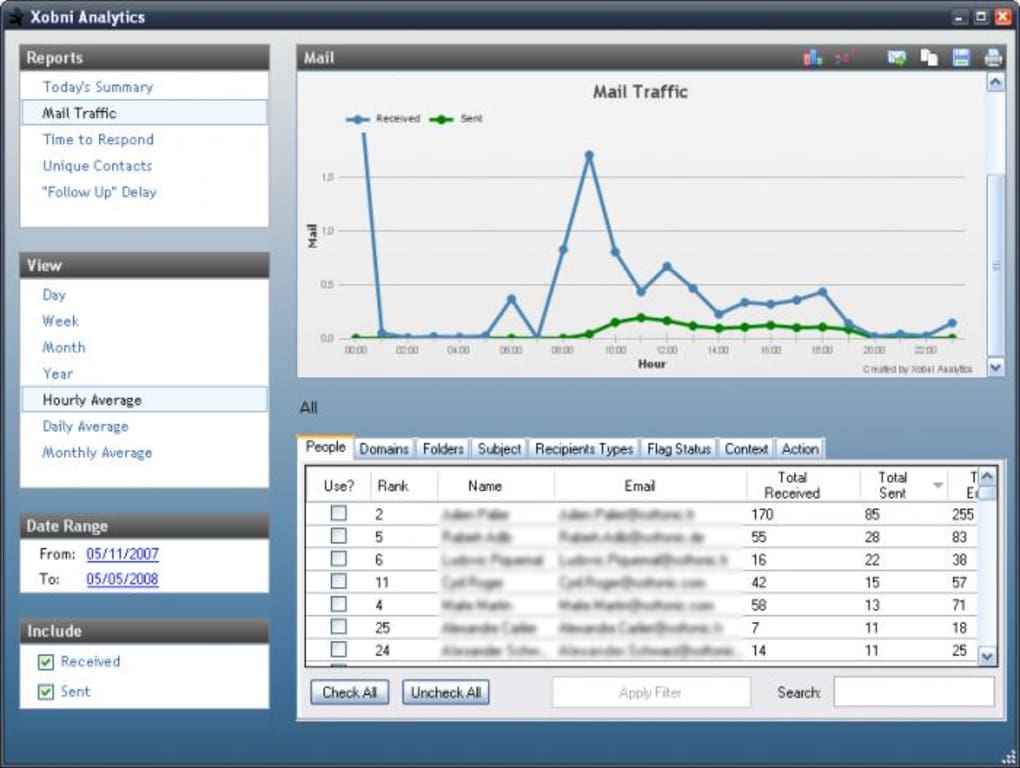
Another standout feature is Email Analytics, which tracks your communication patterns. Xobni assigns a "relationship score" to each contact based on frequency, recency, and message volume. You can visualize your email history with detailed graphs, helping you identify key collaborators, dormant contacts, or high-engagement partners. For professionals managing multiple clients or teams, this insight is invaluable for time management and relationship prioritization.
Xobni also excels in contact intelligence. When an email contains a person’s name, phone number, or address, Xobni automatically extracts and displays it in a personal profile panel. This includes social media links to LinkedIn and Facebook, enabling instant access to deeper contact information.
Attachments are easily discoverable—just search for a file name, and Xobni shows you all emails containing it. Additionally, Xobni supports Yahoo Mail integration, expanding your email reach beyond Outlook. Though Gmail and Hotmail require manual setup, the overall functionality remains robust and user-friendly.
Installation & Usage: Quick Setup, Instant Productivity Boost
Getting started with Xobni is straightforward and takes less than five minutes. First, visit the official Xobni website and download the appropriate version for your operating system—Windows or Mac. The installer is lightweight and runs without requiring admin rights on most systems. Once downloaded, simply run the setup file and follow the on-screen prompts. The installation process automatically detects your Outlook version and configures the plugin accordingly.
After installation, Xobni begins synchronizing with your Outlook data. This process may take a few minutes depending on your mailbox size, but it runs in the background with minimal impact on performance. Once complete, a collapsible sidebar appears within Outlook, housing all Xobni features. You can minimize it when not needed or expand it to access search, analytics, and contact profiles.
Using Xobni is intuitive. To search for a contact, simply type their name in the search bar. Results appear instantly in conversational threads.
Click on a thread to view the full conversation. For analytics, click the "Analytics" tab to see your relationship scores and email trends. To view a contact’s profile, hover over their name in an email or click the profile icon in the sidebar.
The tool also supports keyboard shortcuts for faster navigation. Regular updates ensure improved performance and new features, so keeping Xobni up to date is recommended for optimal experience.
Compatibility & System Requirements
Xobni is designed to work seamlessly with both major operating systems: Windows and Mac. On Windows, it supports Outlook 2007, 2010, 2013, 2016, and 2019, as well as Outlook for Office 365. For Mac users, Xobni is compatible with Outlook 2011 and Outlook for Mac 2016, 2019, and Microsoft 365. The application is lightweight and does not significantly impact system performance, making it suitable for laptops and desktops with moderate hardware.
Internet connectivity is required for initial setup and real-time features like social media integration and analytics. However, once data is cached locally, Xobni functions efficiently even with limited connectivity. The software is free to download and use, with no ads or intrusive pop-ups. It is also secure, encrypting your email data locally and not transmitting sensitive information to third parties without your consent.
While Xobni currently does not support direct integration with Gmail or Hotmail through its interface, users can still access these accounts via Outlook’s built-in IMAP/POP3 setup. This means you can still benefit from Xobni’s powerful search and analytics even if your primary email is hosted on Google or Microsoft’s cloud. Future updates are expected to expand this compatibility, so staying subscribed to Xobni’s newsletter is a good way to stay informed.
Pros and Cons of Xobni: A Balanced Look
- Pros:
- Lightning-fast, conversational email search
- Intuitive sidebar interface with minimal clutter
- Powerful email analytics and relationship scoring
- Automatic contact profile creation with social media links
- Easy attachment discovery across your inbox
- Free to download and use with no hidden costs
- Secure, privacy-focused data handling
- Works on both Windows and Mac platforms
- Cons:
- Limited direct integration with Gmail and Hotmail
- Still in Beta—some edge cases may occur
- Requires Outlook as the primary email client
- Analytics feature may feel overwhelming for casual users
- No mobile app available (iOS or Android)
Frequently Asked Questions (FAQ)
- Is Xobni free to use?
Yes, Xobni is completely free to download and use. There are no subscription fees, ads, or hidden charges. The software remains ad-free and focused on enhancing your Outlook experience.
- Can I use Xobni with Outlook on Mac?
Absolutely. Xobni supports both Windows and Mac operating systems, including Outlook 2011 and newer versions for Mac. The interface is optimized for macOS, ensuring smooth performance and compatibility.
- Does Xobni work with Gmail or Hotmail?
Xobni does not offer direct integration with Gmail or Hotmail through its interface. However, you can manually configure these accounts in Outlook using IMAP or POP3, and Xobni will then work with them as long as they’re synced to your Outlook client.
- Is my data secure with Xobni?
Yes. Xobni prioritizes user privacy. Your email data is stored locally on your device and encrypted. No sensitive information is sent to external servers without your explicit permission. The software operates in a secure, offline-first mode.
- Is there a mobile version of Xobni?
Currently, Xobni does not have a dedicated mobile app for iOS or Android. The tool is designed exclusively for desktop use with Outlook. However, future releases may include mobile support based on user demand.
Final Verdict: Why Xobni is a Must-Have Outlook Add-On
If you’re still struggling with slow searches, disorganized emails, or missed contact details in Outlook, it’s time to try Xobni. This free, secure, and feature-rich plugin transforms Outlook from a chore into a powerful productivity tool. With its intelligent search, insightful analytics, and seamless contact integration, Xobni saves you time, reduces stress, and improves communication efficiency.
While it’s still in Beta and lacks mobile support, the core functionality is mature and reliable. Whether you’re a busy professional, team leader, or freelancer managing multiple clients, Xobni delivers real value. The ability to instantly find emails, attachments, and contact details with just a few clicks makes it a game-changer.
Don’t let a weak search tool hold you back. Download Xobni today—it’s free, secure, and works on both Windows and Mac. Experience the future of email management and finally make Outlook work for you.







